Recent Popular Posts

June 07, 2015

What was accomplished this schooling year

Primary work has focused on classroom interventions in mathematics and problem solving in middle school 5th-8th grade. Many abstract concepts are grounded in middle school and if these are missed they leave gaps unfilled resulting in children having an aversion of mathematics and weak problem solving ability.

One of the aspects of work has been in making learning math fun and accessible for children while changing the perception of what mathematics is both for children and teachers. I had used puzzles, games, educational material, construction of models, electronics to make abstract learning tangible and provide application for children. This is documented in detail in the CriticalThinking_Report.pdf.

This academic year I focused on extensive use of technology starting with programming with Scratch with 6th-8th graders and mapping aspects of Math curricula through projects and challenges in programming. Three broad approaches were adopted for Math curricula through programming:
  1. A set challenges for children that involved demonstrating their understanding of abstract concepts visually through programming including fractions, long division, pie charts e.g. demonstrating what it means to add numerator and numerator and denominator with denominator in a fraction and what is a meaningful way to add it.
  2. A set of challenges were based using programming to understand mathematical ideas visually including linear expressions, percentages, simple and compound interest. As an example 5x+10 was graphed as rectangles of varying heights. Then shapes observed by varying the slopes or varying the added constants were observed and interpretations and explanations explored (stair cases of different kinds including making either the slope or constant a random variable, etc). This was then modified to investigate solutions to equations e.g. 5x+10=75 that used the expression and the pictures and paused when the result was reached.
  3. Children created games that helped them understand a concept and then work on rigor to master an aspect including positive and negative integers, cube roots that resulted in two digit numbers. Once children get into the mode of creating their own programs often when the computer is available they do not drift and get carried away and play games, they tend to create them. If this is done step by step with values that they put in place first that they knew the answer of and then randomizing it they still want to be able to better their own programs.
Programming was also used in English to give life into the stories that the children had created by animating them in scratch. We worked on this project with two grades 7th and 8th. The 7th graders had also used programming for math and their results in terms of how elaborate and complex they could make their stories even though they were younger and were attempting the stories the first time as well was interesting.

Beyond Mathematics and English, programming was taken further into sensing the real world using Makey, Makey. This helped children respond to a real life event like touching a plant, water or items with some moisture content (not complete insulators). Using this the children made their own version of a water tank filling alarm and a non-touch (pressure based) burglar alarm. These exercises helped children connect the programming to sensing the real world and think of applications where they can make use of these aspects in real life.

To complete the loop of controlling in the real world we also worked with the Finch robot and controlling the actions of the robot to go around obstacle courses and deliver small paper balls into goal buckets. The most popular game we created was the parking game with a random set of commands that made the robot move around and having to predict where the robot needs to be placed to reach a certain goal. We used this version at a school fair with success.

It should be mentioned that this approach is significantly different from ready-made material available for children like online lectures (those available in local language), or animation videos that are more or less passive. The so-called educational games that attempt to 'replicate' rigor use the same methodology of trying to get a high score used in the traditional system with the same pitfalls e.g. if given a choice children play games that they are already good at to get a higher score rather than stretch themselves with new games.
However, a paradigm shift is made when instead of trying to program the child through the computer, we let the children be in control and program the machine. In the first paradigm the computer is always right, the child is always a user and playing catch-up. In the second the children realize that the computer actually needs to be given step-by-step and can't make the simplest connections on its own.
It changes the dynamics of children using machines and their thought process in how they think of an action and break them down. It also helps children truly appreciate the amount of work that goes into making a computer look smart!

More interestingly the children learn a lot of implicit knowledge and conventions by using them e.g. the Cartesian system when trying to move their objects in the directions needed. Children who feel like failures with test scores in time bound examinations, persevere and feel proud when they are able to demonstrate their learning.

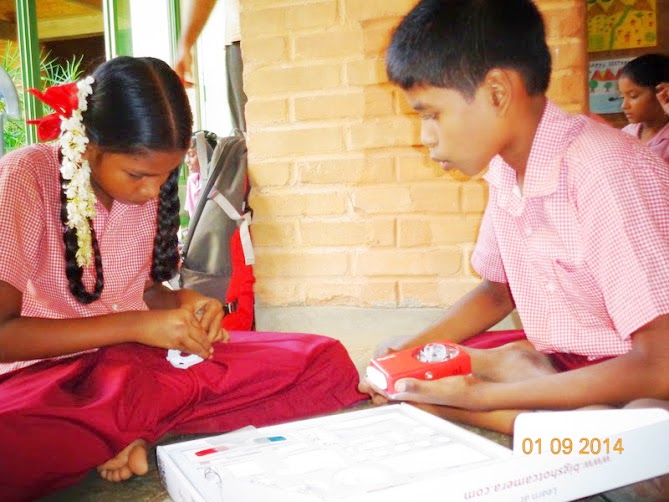
We also used physical technology primarily the DIY bigshot cameras that can be assembled by students and over 60 children from various grades assembled the cameras, took pictures and put them on the computer and then used instructions backwards to disassemble them for the next group to use them. The exercise of group work, reading and comprehending instructions and analyzing the pictures was interesting. The hand crank also gave a context to look into gears, ratios. A lot more could be done in optics, imaging. But, the children were very curious about the 3-D images taken by the camera and experimented quite a bit with depth.

The computer lab at Udavi, Makey, Makey, Bigshot cameras and the finch robot were donated by friends and visitors who saw the impact of technology on children and the interesting mathematics that the children were able to do. Further class notes and work of children is available at (www.smallisbeautiful.blogspot.com).

Just as the response of children to technology is obvious so is the lack of teachers who can play with this interesting resource and engage with children. This was especially true for teachers engaged with village children. As part of filling this gap I founded Aura Auro Design (www.auraauro.com) in collaboration with Aura Semiconductor Pvt. Ltd. this year. Aura Auro Design works with 3 electronics graduates and trains them in state of the art analog design (5 hrs a day) while engaging them for (3 hrs a day) to work with schools with a focus on learning through technology.
This has created a small team of local skilled and technically savvy youth who are learning and teaching at the same time. Aura Auro makes explicit that every teacher needs to be a learner.


It has also created a team that is working on STEM research in rural India to deliver results beyond what one person is capable of.

May 02, 2015

A year in pictures at Udavi School


Here are a few albums related for the 2014-15 schooling year at Udavi (primarily for the 6th grade), special thanks to Sudhir for the pictures. Click on the pictures to take you to the appropriate albums.

Electronics, makey, makey, battery and magnet based motors.

Makey Makey and water level detection.

Bigshot cameras (assembly, pics taken by the cameras, measuring the voltage of the pathway from the motors to the battery, etc).
6th Grade assembly

7th Grade assembly and pics taken

8th Grade assembly


8th Grade visit to crocodile park trip documented with the bigshot cameras they made

Puzzles and games and interaction with Aura Auro youth
.
Working with their hands on blocks and building models

Using wooden blocks to understand squares and square roots

End of the year demonstrations set up by children included demonstration of polarity of motors, games based on continuity, resistance (pencil lead extracted by burning out the wood at just the right temperature), makey, makey burgulary alarm. It also had the children perform about the plants in the solar system and build a rocket that moved.


April 20, 2015

If I had wings...

The work with the children in Udavi 8th Grade for their end of the year story called 'if I had wings' felt quite complete. I have already put a note on what I saw in the children when they were looking at their work and about their work itself.

Preparation: For the class project with the 8th graders on if I have wings we first set up the computers to be networked so they could save their data in one place. This helped us back up their files track their progress from one place.

Pairs: I noticed that the boys and girls don't seem to work much with each other and asked the boys and girls to pair up. I also asked them to plan what they wanted to accomplish as the time was short. They were also required to come up with quality criteria.

Day 1:  The class came up with the quality criteria to look at their projects through consensus:
Understandable,  Colorful, Creative, Beautiful, Proper Language, Interesting and Teamwork.

We also had the following agreements - discussion within the group is fine, but disturbing other groups is not ok. If technical assistance is needed you raise your hand. The classes had a little hum going like a bees bussing, but it never got too loud or noisy.

Sundar and I were providing support and we had asked the teacher also to join the children in making her own program.

The technical instruction of the day was on linking to the central computer and to Open and Save files over the network. This itself made a big difference to the children in the project. There appears nothing dampens enthusiasm as the possibility of destruction of your work and being able to build on their work gave them a sense of purpose.

Day 2: The children felt confident that they could get what they wanted to done and we opened up the space for them to access the internet and download images that they might find useful for their project and not limited to images in Scratch.

The instruction of the day was a demo of Gimp, contiguous selection which could help crop backgrounds quickly and help them use characters downloaded from the internet.

There was also instruction on not using the green start flag and using an event instead. All events were named with unique names by using the first two letters of both the children in the group. Similarly all sprites and backgrounds were named by adding the 4 letters to the end to avoid clashes when the programs were merged.

One of the groups went overboard and even named their character in their story the same name as their code names.

Day 3: To bring back focus on the project as some groups were drifting we had a session on feedback for growth. Each group watched what the next group had done and offered increase, decrease and retain feedback on the quality criteria.
There was some concern among us teachers that there is nothing to show yet.

Before the next class we looked at 2 groups who were really struggling and put a few lines of code giving them an idea of how to go about animating.

Day 4: They worked, we supported and kept shuttling around groups. 3 groups were satisfied with their work and called it done. 5 groups were not done.

We agreed to have a Day 5, but decided that the groups who were done would have to take it to the next level and start working on combining files with us.

Day 5: We started combining the files and came up with a much larger list of to dos in individual projects to make merging possible:
1) Append name of sprites, backgrounds with unique name for each group (we used the first two letters of the two children in each group)
2) Make each sprite hide  when the green flag is pressed
3) Each sprite is message driven and each message has the unique name followed by 1, 2, etc.
4) BG changes are also within the sprites (using change background)
5) Make the begin position of each sprite explicit

6) Hide when done

We were able to combine the three projects that were complete and we asked the children to go ahead and join the remaining groups supporting them through this code review and making the work of merging easier.

Day 6: We showed the children their combined work, they did a self assessment for themselves and we also did a survey for the children.

It was interesting to see quite a few children in the survey point to teamwork as a big learning for themselves another was getting what they set out to do done.


April 19, 2015

Wake up, Sanjeev...

Towards the end of the year I was invited by the English teacher at Udavi to do a session for closing the year with the 8th graders with making their stories in scratch.I had worked extensively with technology with the 7th graders for Math and this reflected in their abilities to program and create their stories in English, but a similar project with the 8th graders had not felt complete. She offered 4 classes (of 1 hr 20 min each) to get something whole done. The schedule was very tight and we went over what were our priorities they were to support children in their organization, concentration, determination to get their work done and teamwork. The theme of their work was 'if I had wings' and we wanted them to be able to dream and see it materialize.

The days flowed beautifully and we needed one extra day for 5/8 groups to complete and we working with the 3 group of students who completed to look at what it would take to merge the projects into one class project. The children started to look at reviewing the code to merge the projects.

The next class we looked at the combined project of all the children. It was a 4-1/2 minute animation that had no sound. We started watching the animation. About a minute into the animation I had a Wake up, Sanjeev moment. These are moments that you have when as a teacher something tells you to sit up and take notice about something happening in your class. I realized something magical was happening. The children were concentrating and looking at their work and the work of all their classmates as one drama. Children from the generation that have seen television at it loudest, flashiest and who are often seen as having too much noise were in full concentration in complete silence. Luckly, my wake up call came early enough for me to take a few photographs and then go ahead a record 40 seconds of the magic.

Here is the video of the children watching their work...


and here is their work:


Here is a note on the process we followed in the five days and how it was one of the times when things just flowed and fell in place.

April 07, 2015

A simple square rooting game

At Isai Ambalam a couple of the children I was working intensely with programing graduated, it left a small class of 6th graders and a couple of 8th graders. The youth with AuraAuro took up various classes including my 6th grade. I was left shuttling between classes and the 8th graders. The 8th graders who are still here are not ready for their next grade both in language and math. Taking a leaf from my being independent book they were keen on taking the initiative and learning on their own and asking for help when they needed it. They were working on squares and square roots for a week on their own..., but I realized that they were not quite getting the sense of the numbers. They were doing much drill, making mistakes, but unable to notice their mistakes or having a ball park estimate. 

They are hesitant to program themselves and had relied heavily on their partners who had left school. I asked them if they wanted to the computer as a calculator...they readily agreed (ha!).

Looking around and starting visualization
The sixth graders were drawing the representation of linear expressions like 5x+10 (and then changing the constant or the slope and getting various staircases for positive values of x. I asked the 8th graders if they would like to use scratch as a calculator and do the same for x^2 = x*x. They plotted it along with the linear curves and soon realized the much faster rate of its growth to exceed the screen size. They felt that x^3 should perhaps increase even faster and went ahead and implemented it to find out.

We talked about the possibility of using the computer to find the square roots of numbers by repeated calculating x^2 for numbers starting from 1 and stopping when they reached the numbers as given in the book.

Starting to look at the consecutive squares
We made a very simple program which started with x=1 kept incrementing x it by one and calculating a square (one multiplication per second). Scratch can automatically show the variables of your choice making it easier since we didn't need to program the printing.

They started looking at the results of squares of numbers and basic internalizations that the squares of numbers do increase as numbers increase and start to notice a few basic squares that they knew.

Efficiency of calculation
As we got to 4 digit numbers the time taken by the program was quite a lot and I asked them what could be done to speed up the program without changing 1 multiplication per second. My argument for the constraint was that that much time is required to register the square of a number and I did want them to connect a number to a square.

It took them a little while, but they concluded that we could start with squares of every 10 numbers 10, 20, 30, 40, etc and stop when the number was overshooting, go back one level and then increment by 1 to get to the result.

This reduced the square of 69 from 69 seconds to 7+9=16 seconds. They also started getting a clearer understanding of the ball park of the squares since these were the same as the squares single digit numbers in 100s.

Guessing the result
This brought us to the most interesting part of the book that talked about how you could guess the square root of a perfect square (of a 2 digit number). It talked about getting the 10s place of the number. They could see this from the program the optimized code a number like 2209 needed to be in the 40s as 40^2=1600 and 50^2=2500. It was then a matter of which of the 40s gives the result. 

This brought us to the ones/units place and the fact that there is a clear mapping (two to one at times) between the units of the number and the units of its square, e.g. 2/8 have 4 in the units place, 3/7 have 9, 4/6 have 6, 5 is just 5 and 1/9 have 1. 2,3,7,8 do not come in the units place of a perfect square of an integer. 

Looking at 2209, it could have a square of either 43 or 47. The next choice is determined by whether it is closer to 40^2 (1600) or 50^2 (2500).

Permeating
The fun with being able to guess something marginally larger than they thought they were originally capable of was that they showed what they could do to the 6th graders who were promptly curious on how this was all done and learnt it too.

This gave them endless fun of resolving the solution and pitting themselves against their program and getting the solution before it did.